Azure CloudScanner SaaS Architecture
Azure CloudScanner SaaS enables Upwind to scan eligible Azure resources without deploying scanner compute inside the customer's Azure environment.
In this model, the customer grants Upwind access during onboarding by provisioning Upwind service principals in their Microsoft Entra tenant and assigning them scoped Azure roles. These identities allow Upwind to discover subscriptions, fetch resource information, identify eligible resources, create snapshots, and execute the required scan workflow through secure cross-tenant access.
The CloudScanner compute itself runs in Upwind-managed Azure subscriptions, in resources dedicated to the customer's scanning operations.
Architecture Overview
The Azure CloudScanner SaaS architecture includes two main areas:
- Customer Azure Tenant
- Upwind Azure Tenant
Each area has a different responsibility in the onboarding and scanning flow.
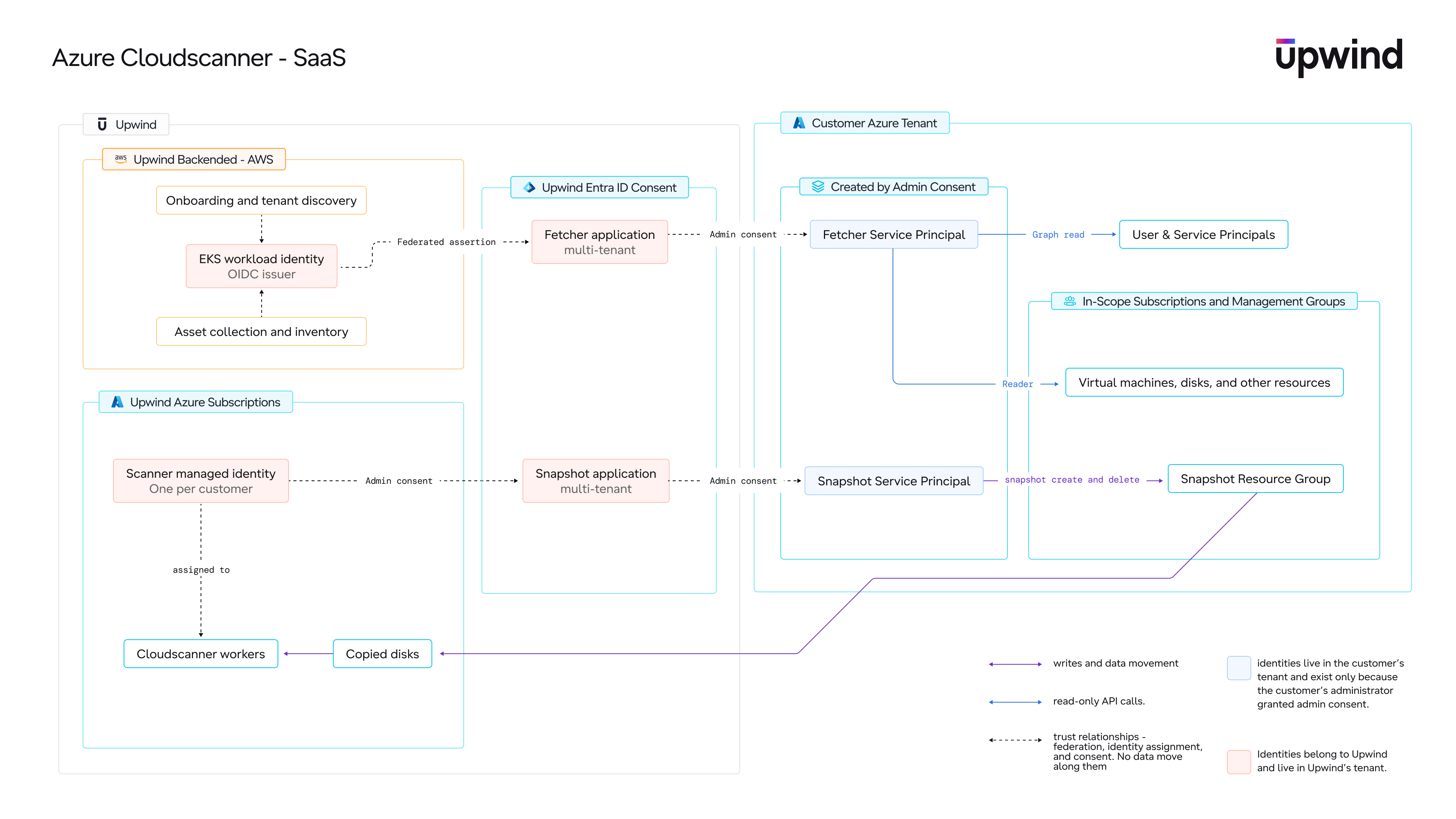
Scan Flow
The SaaS scan flow moves through four stages: onboarding and discovery, cross-tenant access, scanning, and reporting.
Onboarding and discovery
- Connect - The customer connects their Azure environment (tenant, management groups, or subscriptions) to Upwind during onboarding and designates an Orchestrator Subscription.
- Grant access - The onboarding deployment provisions the Upwind service principals in the customer tenant and assigns them the required Azure roles at the selected scope.
- Fetch resources - Upwind uses the Onboarding Service Principal's read-only access to enumerate subscriptions and fetch resource information through Azure Resource Manager API calls.
- Identify eligible resources - Upwind identifies eligible resources across the connected subscriptions and the Azure regions they run in.
Cross-tenant access
- Authenticate - Upwind's scanning workloads authenticate into the customer tenant using federated authentication with short-lived tokens. No standing credentials for the customer environment are stored on either side.
Scanning
- Snapshot - For snapshot-based scans, the Scanner Service Principal creates a snapshot of the target disk inside the customer tenant. Snapshots are created with Microsoft Entra-only data access (
dataAccessAuthMode: AzureActiveDirectory), so no SAS URIs or shared keys are involved. - Copy - The snapshot is copied cross-tenant into the customer's dedicated scanning resources in the Upwind-managed scanner subscription. The copy is a single Azure Resource Manager operation that Azure authorizes against both tenants at once, and the data path stays internal to Azure.
- Process - CloudScanner workers running in the Upwind-managed scanner subscription attach the copied disk and perform the scan.
Reporting and cleanup
- Report - Results are reported back to the Upwind platform.
- Clean up - The snapshot in the customer tenant and the copied disk in the Upwind environment are deleted as part of the scan workflow.
Identities
The architecture relies on a small set of identities. The customer-facing identities are service principals that materialize in the customer tenant during onboarding; the Upwind-side identities never appear in the customer environment.
Onboarding Service Principal
Provisioned in the customer's Microsoft Entra tenant during onboarding.
This service principal is responsible for fetching subscription and resource information through Azure Resource Manager API calls. It holds the built-in Reader role at the connected scope, allowing Upwind to discover the resources that exist across the customer's Azure environment, support the resource fetching and inventory process, and identify which resources are eligible for scanning. It has read-only access and cannot modify anything in the customer environment.
Scanner Service Principal
Provisioned in the customer's Microsoft Entra tenant during onboarding.
This service principal is responsible for the customer-side actions of the scan workflow: locating target disks, creating and reading snapshots, authorizing the cross-tenant snapshot copy, and deleting snapshots after the scan completes. It holds the following built-in roles:
| Role | Why it is needed |
|---|---|
| Reader | Locate target virtual machines and read disk references for snapshot source identification |
| Disk Snapshot Contributor | Create and manage snapshots of customer-owned managed disks |
| Data Operator for Managed Disks | Authorize Entra ID-based snapshot access for the cross-tenant disk copy |
Upwind-Side Identity
For each customer organization, Upwind provisions a dedicated managed identity in its own Azure environment. This identity is assigned only to that customer's scanning workers and is scoped only to that customer's scanning resources. It is the identity the workers use to authenticate, through federated credentials, into the customer tenant as the Scanner Service Principal.
Because the trust configuration for each customer accepts only that customer's Upwind-side identity, one customer's scanning infrastructure cannot obtain tokens for another customer's tenant.
Tenants and Subscriptions
1. Customer Azure Tenant
During onboarding, the customer connects their Azure environment to Upwind at the scope they choose: the entire tenant, one or more management groups, or specific subscriptions. As part of this process, the customer designates an Orchestrator Subscription.
The customer-side deployment consists of identities and role assignments only. No scanner compute, virtual machine scale sets, Key Vaults, or customer-side managed identities are created.
Orchestrator Subscription
The customer selects one subscription to act as the Orchestrator Subscription. It serves as the customer-side anchor point for the scan workflow: snapshots created during scanning are managed through it.
The Orchestrator Subscription must not be deleted. Removing it disconnects Upwind from the environment.
Target Subscriptions
The subscriptions where the customer's eligible resources are located. The Onboarding Service Principal reads resource information from them, and the Scanner Service Principal snapshots eligible disks in them, based on the scope the customer defines during onboarding.
2. Upwind Azure Tenant
The Upwind Azure Tenant hosts the CloudScanner infrastructure for all SaaS customers, with strict per-customer isolation.
Upwind operates scanner subscriptions in the Azure regions where customers have eligible resources. Within each regional scanner subscription, every customer organization is assigned its own isolated set of resources:
- A dedicated resource group holding that customer's scanning resources
- A dedicated virtual network, with network rules that deny traffic between customer environments
- Dedicated CloudScanner worker virtual machine scale sets, scaled by Upwind based on scanning workload
- A dedicated managed identity, used only by that customer's workers
Access to each customer's resource group is restricted to that customer's identity, so scanning operations are isolated per customer.
A CloudScanner deployed in a specific region scans eligible customer resources in that same region. For example, resources in eastus are scanned by a CloudScanner running in eastus, and resources in westeurope are scanned by a CloudScanner running in westeurope.
This keeps the scanning process regionally aligned while still allowing Upwind to manage the scanner compute from the SaaS environment.
Trust and Access Model
Cross-tenant access is built on standard Microsoft Entra ID mechanisms: the customer tenant holds Upwind service principals with scoped role assignments, and Upwind's scanning workloads obtain short-lived tokens for those service principals through federated authentication.
| Access pattern | Identity | Used for | Example actions |
|---|---|---|---|
| Read-only | Onboarding Service Principal | Discovery, inventory, and resource visibility | Enumerating subscriptions; fetching resource metadata through Azure Resource Manager API calls; identifying eligible resources |
| Snapshot lifecycle | Scanner Service Principal | Actions required to execute the scan workflow | Locating target disks; creating snapshots; authorizing the cross-tenant snapshot copy; deleting snapshots after the scan |
Key properties of this model:
- No standing secrets in your tenant. Authentication is federated and token-based. Onboarding does not store scanner credentials, create a Key Vault, or create managed identities inside the customer environment.
- Unilateral revocation. The customer can revoke Upwind's access at any time by deleting the consented service principals or removing their role assignments; access is cut off on the next token refresh, with no coordination with Upwind required.
- Auditable. All customer-side actions are performed by the two service principals and appear in the customer tenant's activity logs under their application IDs.
Reference
Customer-Side Identities Summary
| Identity | Location | Purpose |
|---|---|---|
| Onboarding Service Principal | Customer Microsoft Entra tenant, Reader at the connected scope | Fetches subscription and resource information through Azure Resource Manager API calls, supports discovery and inventory, and identifies eligible resources |
| Scanner Service Principal | Customer Microsoft Entra tenant, snapshot roles at the connected scope | Executes the customer-side scan actions: snapshot creation, cross-tenant copy authorization, and cleanup |
Upwind-Side Environment Summary
| Component | Purpose |
|---|---|
| Regional scanner subscriptions | Upwind-managed Azure subscriptions, one per supported region, hosting the CloudScanner worker fleets |
| Per-customer resource group, network, and workers | Isolated scanning resources dedicated to a single customer within each regional scanner subscription |
| Per-customer managed identity | The only identity that can authenticate into that customer's tenant as the Scanner Service Principal |
Key Architectural Principles
- Scanner compute does not run inside the customer Azure environment.
- The customer-side deployment consists of Microsoft Entra identities and Azure role assignments only.
- The Onboarding Service Principal is responsible for resource discovery and inventory through read-only Azure Resource Manager API calls.
- The Scanner Service Principal is responsible for the customer-side snapshot lifecycle.
- Authentication is federated and short-lived; no standing customer-side credentials exist.
- CloudScanner infrastructure runs in Upwind-managed subscriptions with per-customer isolation.
- CloudScanners are deployed per relevant region and scan eligible resources in the same region.
- Snapshots are created in the customer tenant with Entra-only data access and copied to the Upwind environment for scanning.
- Scan results are reported back to the Upwind platform.
- Cleanup of snapshots and copied disks is handled as part of the scan workflow.
- The scan output is equivalent to the self-hosted / Outpost CloudScanner deployment model.
Security Considerations
Ephemeral disk copies do leave your Azure environment and are processed inside Upwind-managed Azure subscriptions in the same region. The snapshot in your tenant and the copied disk in the Upwind environment are deleted after scanning completes.
Snapshots are created with dataAccessAuthMode: AzureActiveDirectory, and the cross-tenant copy is authorized with Microsoft Entra tokens on both sides. No SAS URIs or shared keys are used anywhere in the scan data path, and every access is attributable to a service principal in your tenant's audit logs.
The service principals in your tenant hold only built-in Azure roles scoped to what the scan workflow requires - read access for inventory and snapshot lifecycle permissions. No owner- or contributor-level access is granted.