gVisor Support in the Upwind Agent
Overview
gVisor is a security-focused container runtime that provides enhanced isolation between applications and the host operating system. Unlike traditional container runtimes that rely on kernel namespaces and cgroups, gVisor implements a userspace kernel that acts as a "sandbox" for containers. This approach significantly reduces the attack surface and minimizes the potential impact of vulnerabilities, offering an additional layer of defense for sensitive workloads.
How gVisor Integration Works
The Upwind Agent integrates with gVisor's built-in tracing capabilities to monitor containerized applications running in gVisor sandboxes. gVisor provides support for streaming application actions (trace points) to external processes for validation and anomaly detection.
Architecture
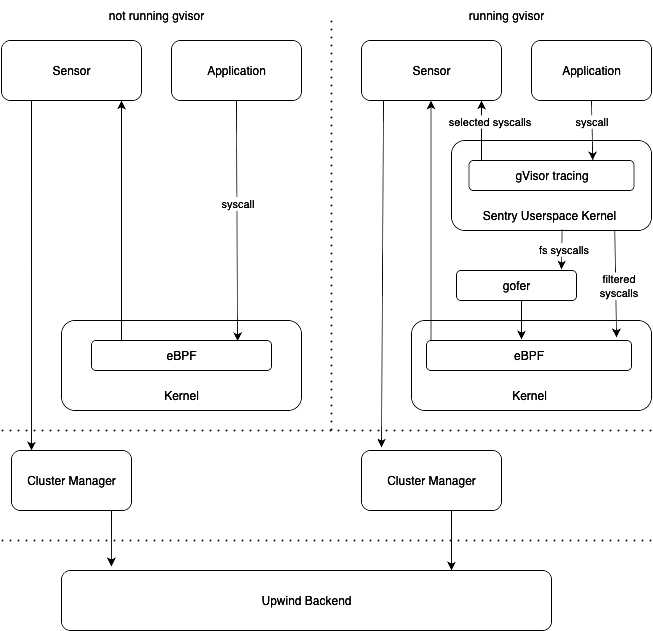
When gVisor is enabled:
- gVisor Sentry Kernel: Intercepts selected syscalls from the application
- Trace Points: Available for all syscalls and important events (e.g., container start)
- Unix Domain Socket: gVisor sends trace events to the Upwind Agent via a Unix domain socket using protobuf
- Event Translation: The Upwind Agent translates gVisor payloads to existing event structures (e.g., ProcessEventEntry) and processes them alongside eBPF events
Unlike standard deployments where eBPF monitors syscalls directly from the kernel, gVisor-enabled deployments receive filtered syscalls from gVisor's userspace kernel, providing an additional security boundary.
Prerequisites
- gVisor runtime installed and configured in your container environment
- Proper file permissions for Unix domain socket communication
Using gVisor-Enabled Agent Images
The Upwind Agent images with gVisor support use special tags with a -gvisor suffix to indicate that they include the necessary gVisor dependencies.
Image Tag Format:
- Standard image:
v0.121.2 - Image with gVisor support:
v0.121.2-gvisor
When deploying the Upwind Agent with gVisor integration enabled, make sure to use the image tag with the -gvisor suffix to ensure all required dependencies are included.
Example
# For gVisor-enabled deployments
image: upwind/upwind-agent:v0.121.2-gvisor

# Standard deployment (without gVisor)
image: upwind/upwind-agent:v0.121.2
Configuration
Enabling gVisor in the Upwind Agent
To enable gVisor support, configure the following options:
--gvisor-tracing=true
--gvisor-root=/run/containerd/runsc/k8s.io/
--gvisor-trace-uds-path=/var/lib/containerd/gvisor_events.sock
--gvisor-trace-config=/etc/gvisor/gvisor_default_session.json
--gvisor-remote-tracing-port=-1
Note: The default value for --gvisor-tracing is false. All other values shown are defaults.
Environment-Specific Settings
- Kubernetes: Use the default
--gvisor-root=/run/containerd/runsc/k8s.io/ - Docker: Set
--gvisor-root=/var/run/docker/runtime-runc/moby - Remote Tracing: Use
--gvisor-remote-tracing-portto send trace events via TCP instead of Unix domain socket (useful when UDS path cannot be mounted)
Helm Chart Configuration
When deploying via Helm, use the following values:
| Key | Type | Default | Description |
|---|---|---|---|
gvisor.enabled | bool | false | Whether to enable gVisor integration |
gvisor.remoteTracePort | int | -1 | Port for gVisor remote tracing (optional) |
gvisor.root | string | /run/containerd/runsc/k8s.io/ | Path to the gVisor root on the host |
gvisor.traceConfig | string | /etc/gvisor/gvisor_default_session.json | Path to the gVisor trace config |
gvisor.traceUdsPath | string | /var/lib/containerd/gvisor_events.sock | Path to the gVisor socket |
Automatic Trace Registration
The Upwind Agent automatically monitors the gVisor root directory for new sandboxed containers. When a new container is detected:
- The agent registers a file watcher on the gVisor root directory
- Upon container creation, it detects the new runsc sandbox socket
- Tracing is automatically registered based on the provided
session.jsonconfiguration
Manual Trace Configuration
To manually enable tracing for a gVisor container:
sudo runsc --root /var/run/docker/runtime-runc/moby trace create --config session.json ${CONTAINER_ID}
For Kubernetes environments, use /run/containerd/runsc/k8s.io as the root path.
Trace Session Configuration
The session.json file configures which events to send to the Upwind Agent. Example configuration:
{
  "trace_session": {
    "name": "Default",
    "points": [
      {
        "name": "sentry/clone"
      },
      {
        "name": "sentry/execve",
        "context_fields": [
          "time",
          "group_id",
          "process_name",
          "container_id",
          "credentials"
        ]
      },
      {
        "name": "syscall/execve/enter",
        "context_fields": ["group_id", "process_name"]
      }
    ],
    "sinks": [
      {
        "name": "remote",
        "config": {
          "endpoint": "/tmp/gvisor_events.sock"
        }
      }
    ]
  }
}
Available Context Fields
timethread_idtask_start_timegroup_idthread_group_idthread_group_start_timecontainer_idcredentialscwdprocess_name
Important: The endpoint in the remote sink section must correspond to the --gvisor-trace-uds-path option in the Upwind Agent.
Benefits
- Enhanced Security: Additional isolation layer between applications and host kernel
- Reduced Attack Surface: Userspace kernel limits potential exploit vectors
- Seamless Integration: Works alongside existing eBPF monitoring
- Automatic Detection: Monitors and registers new gVisor containers automatically
- Unified Event Processing: gVisor events are processed through the same pipeline as eBPF events
Additional Notes
- Ensure you have a valid trace session configuration file
- The Upwind Agent must have appropriate file permissions to access the Unix domain socket
- gVisor integration works alongside existing eBPF-based monitoring