Outpost
Overview
With the Outpost deployment model, Cloud Scanners are deployed and run inside your own AWS environment. Upwind provisions the scanner infrastructure (workers, ASGs, scaling and cleanup lambdas, supporting IAM roles and networking) within the AWS Organization you onboard, and the platform talks to those scanners via the cross-account IAM roles created during onboarding.
Outpost is the long-established Upwind onboarding path and is the right fit for organizations that need scanner compute to stay inside their own tenancy. For the alternative model where Upwind hosts the scanner infrastructure, see the SaaS deployment model.
Architecture
AWS Organizational Onboarding integrates AWS Organizations with Upwind by leveraging IAM roles for automated account discovery. The process also includes creating read-only access roles for security auditing, and designating an orchestrator account for Cloud Scanner integration. This architecture supports centralized management and secure access across all member accounts within the organization.
The terminology used in this documentation aligns with the Terminology and concepts for AWS Organizations.
Connecting an AWS organization involves three integration steps:
| Step | Description | Purpose |
|---|---|---|
| 1 | Enable account discovery across your organization. This step involves creating an IAM role to enable the discovery of all member accounts within your AWS Organization.
| Account discovery |
| 2 | Designate an orchestrator account for Upwind. This step involves selecting an existing AWS account to serve as the Upwind orchestrator account. Within this account, an additional IAM administration role will be created. This role is essential for managing cloud scanning operations, as it grants Upwind the necessary permissions to execute tasks across all member accounts efficiently.
| Cloud scanning |
| 3 | Enable secure read only access to all accounts. This step involves creating IAM roles in all member accounts to ensure secure management, monitoring, and protection. If a designated orchestrator account is selected, necessary IAM roles will also be created to support cloud scanning operations, ensuring comprehensive management and monitoring capabilities.
| Security auditing |
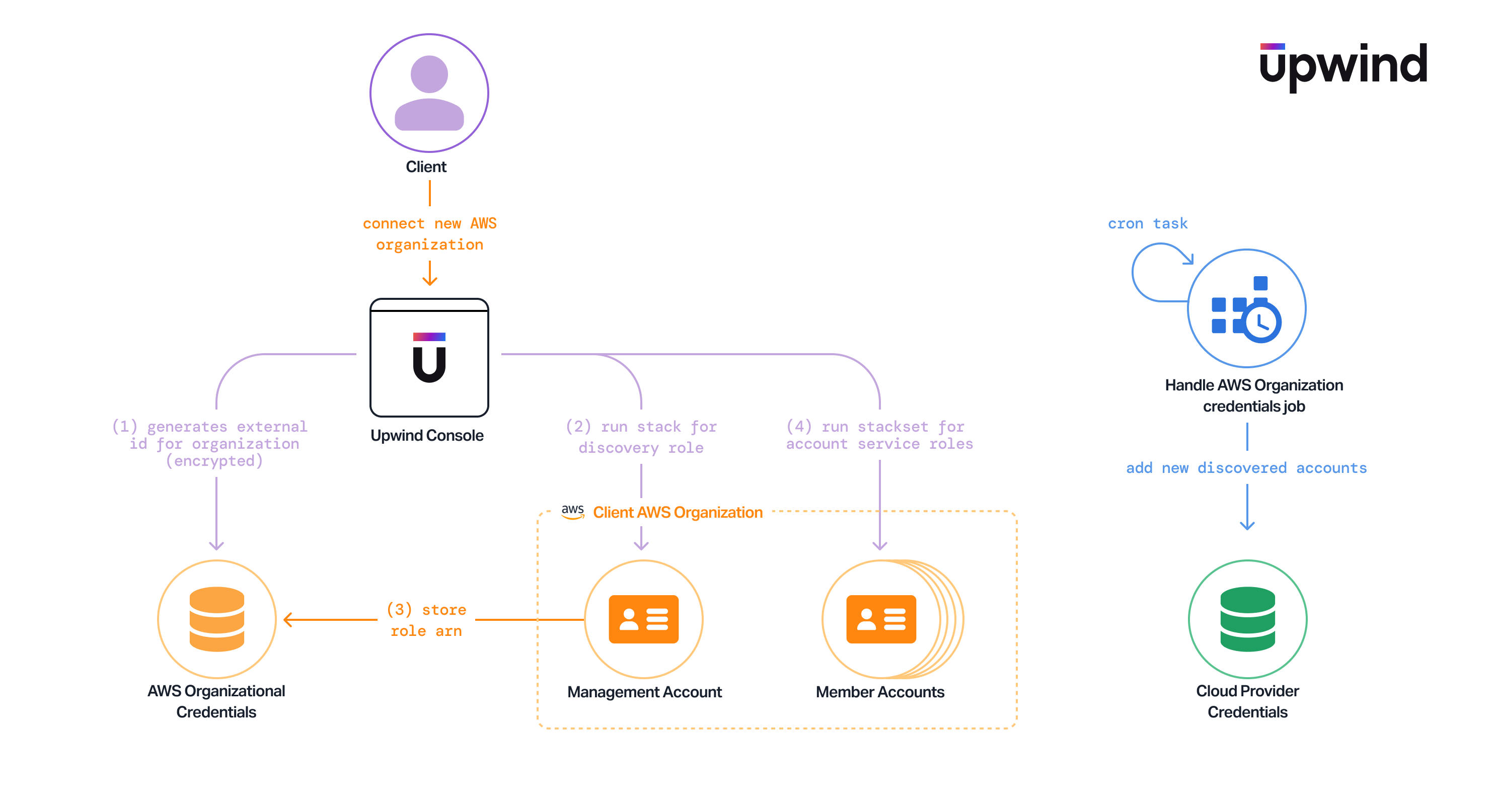
The diagram illustrates how to connect a new AWS organization to the Upwind platform using the Outpost deployment model.
Integration
The integration methods available for creating the necessary IAM roles for Upwind are as follows:
Already connected and need newer IAM permissions for features such as Data Security? See Update Onboarding.
Already an Upwind customer using the legacy 3-stack model? See Migration for the path to the new organizational onboarding experience.