AWS Terraform Single Account all in one Onboarding
Overview
This guide explains how to install Upwind Onboarding, CloudScanner, and CloudScanner cross-account roles using a non-organization approach with a single main.tf file.
The goal is to define a single Terraform configuration you can apply to all regions and accounts. This eliminates the need to micromanage configurations or use the Upwind console for every step.
Prerequisites
CloudScanner Configurations
The standard single account installation usually requires the Upwind UI. This approach skips the UI by deploying directly via Terraform. You must obtain a Scanner ID from the UI for each region.
Deploy CloudScanners is only enabled once you already have at least one AWS account connected to Upwind in single account mode. Until then the button is greyed out and you cannot create a scanner or retrieve its ScannerId. CloudScanners you already run in another cloud provider, such as Azure, do not enable it.
You have two ways to get past this:
- Connect one account first. Connect a single AWS account through the Upwind console, following Instructions. Once that account is connected, create the CloudScanners, retrieve their IDs, and then apply the Terraform in this guide across your accounts and regions.
- Apply with placeholder Scanner IDs. Apply the Terraform to your accounts with placeholder values in
scanner_id_region_map. Applying theaws-accountmodule connects the accounts, which enables Deploy CloudScanners. Create the CloudScanners, then replace the placeholders with the real IDs and apply the Terraform again.
To create a Scanner ID:
- Navigate to the Upwind console -> Components page -> Cloud scanners tab.
- Click Deploy CloudScanners.
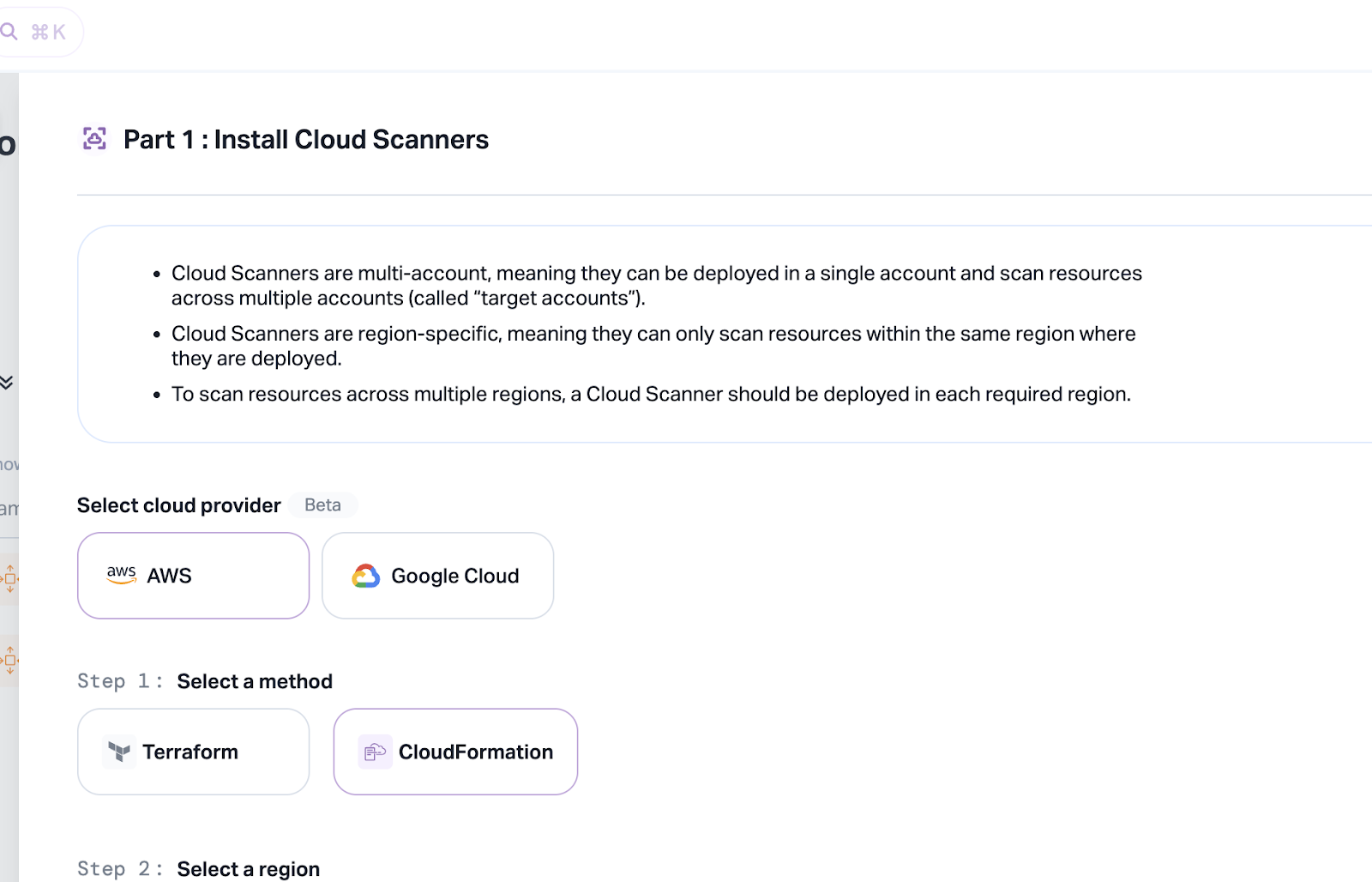
- Select your region, name the scanner, and click Save.
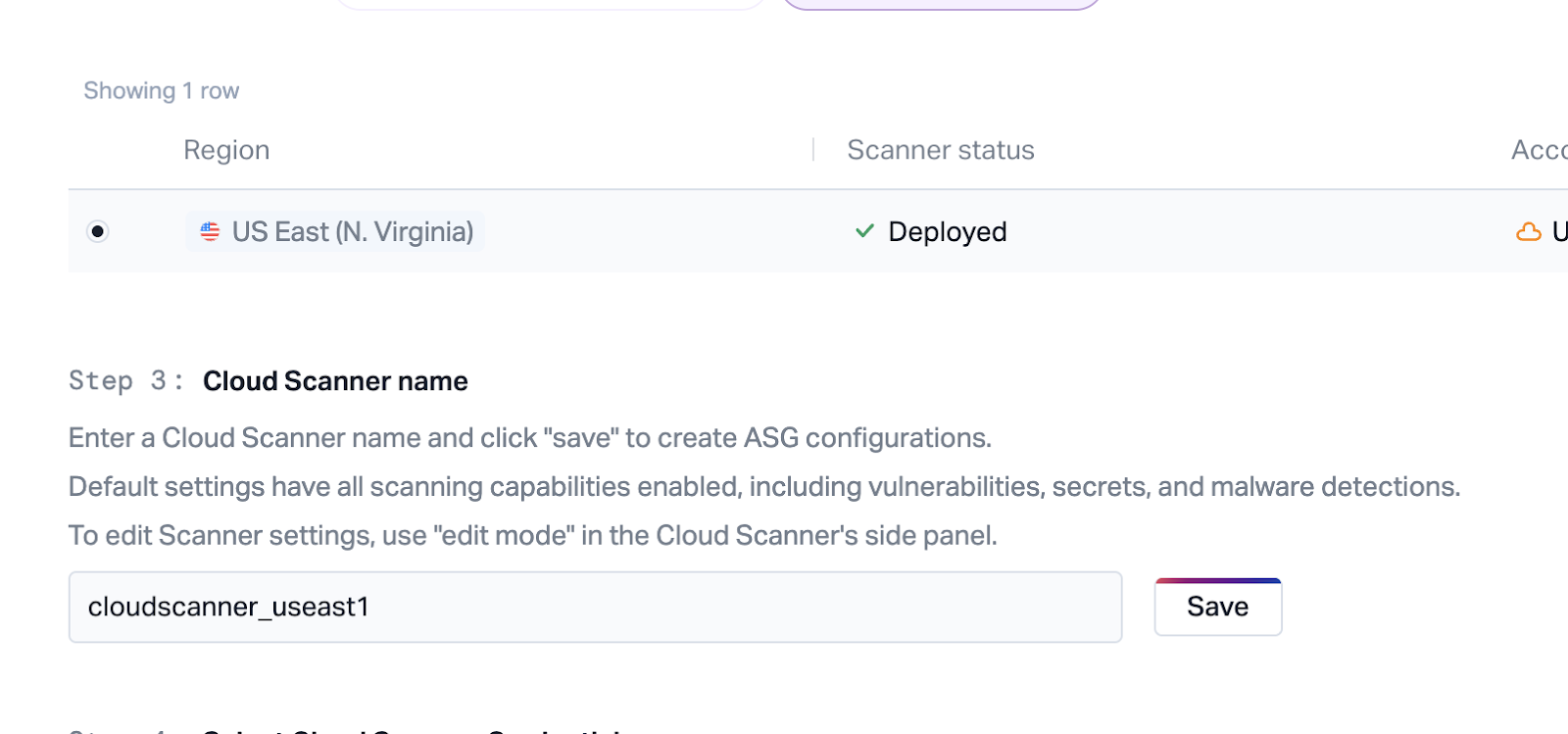
- Exit to the Cloud scanners main tab.
- The scanner appears in an Unhealthy state.
- Click the row to retrieve the
ScannerId.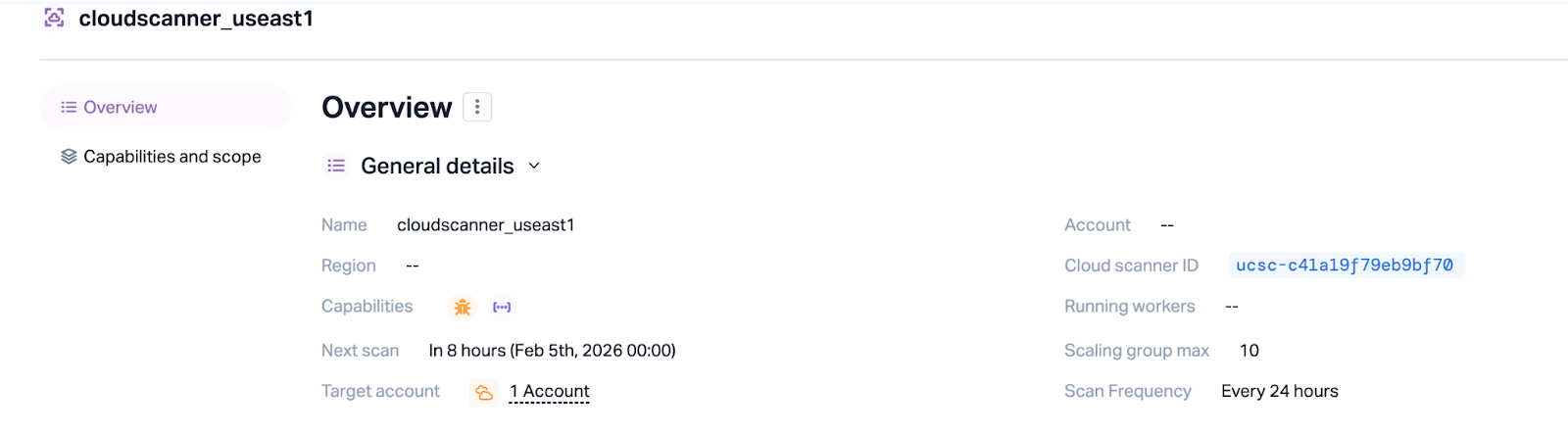
Secrets Manager
This guide assumes you pass credentials to Terraform as ARNs rather than inline values.
Cloud Credentials
Generate these via the Upwind console, in the Settings -> Access Management -> Credentials tab, by clicking on Generate credentials, and create Cloud account credentials. You may name the credentials for future context. Store them in AWS Secrets Manager in the following JSON format:
{
  "client_id": "<clientId>",
  "client_secret": "<clientSecret>"
}
Cross-account Access
To grant cross-account access to the secret, you must use a Customer Managed Key (CMK) instead of an Amazon-managed KMS key. Apply a resource policy to the secret to grant access to your callers:
{
  "Version": "2012-10-17",
  "Statement": [
    {
      "Sid": "AllowUpwindTerraformRoleRead",
      "Effect": "Allow",
      "Principal": {
        "AWS": [
          "arn:aws:iam::<accountId>:role/aws-reserved/sso.amazonaws.com/<terraformRole>"
        ]
      },
      "Action": [
        "secretsmanager:GetSecretValue",
        "secretsmanager:DescribeSecret"
      ],
      "Resource": "*"
    }
  ]
}
CloudScanner Credentials
In the Upwind Console, generate credentials of type Sensor. Store these in AWS Secrets Manager under the orchestrator account and replicate them to each region where you install a CloudScanner. This allows scanners to access keys locally using a "friendly name."
The value must use this format (note the camelCase difference):
{
  "clientId": "<clientId>",
  "clientSecret": "<clientSecret>"
}
Terraform Configuration
You require three files per account/region:
terraform.tfvars: Contains your specific configuration variables.main.tf: Contains the logic to deploy modules based on the environment.provider.tf: Defines the AWS provider and region.
terraform.tfvars
Use the same file for all deployments.
# Region to install onboarding IAM roles
iam_region = "us-east-1"

# Account ID where CloudScanner compute is provisioned
orchestrator_account = "12345678"

# ARN of the secret containing cloud credentials
upwind_credentials_cloudaccount = "arn:aws:secretsmanager:us-east-1:12345678:secret:upwind-cloud-credentials"

# Friendly name of the replicated secret containing CloudScanner credentials
upwind_credentials_cloudscanner = "upwind-cloudscanner-creds-region-replicated"

# Map of regions to pre-created Scanner IDs
scanner_id_region_map = {
  "us-east-1": "ucsc-abc123",
  "us-east-2": "ucsc-def123",
}

# Accounts covered by CloudScanners
cloudscanner_target_accounts = ["12345678", "98765432"]

# Accounts authorized for DSPM (S3) scans
dspm_account_whitelist = ["12345678", "98765432"]

# Maximum number of CloudScanner workers
cloudscanner_max_asg_size = 10
main.tf
This file contains the logic to deploy the correct modules based on the current account and region.
data "aws_caller_identity" "current" {}
data "aws_region" "current" {}

variable "upwind_credentials_cloudaccount" {
  type        = string
  description = "The ARN of the Upwind cloud credentials secret."
}

variable "upwind_credentials_cloudscanner" {
  type        = string
  description = "The friendly name of the Upwind CloudScanner credentials secret."
}

variable "orchestrator_account" {
  type        = string
}

variable "scanner_id_region_map" {
  type        = map(string)
}

variable "cloudscanner_target_accounts" {
  type        = set(string)
}

variable "iam_region" {
  type        = string
}

variable "cloudscanner_max_asg_size" {
  type        = number
}

variable "dspm_account_whitelist" {
  type        = set(string)
}

locals {
  awsAccountId      = data.aws_caller_identity.current.account_id
  awsRegion         = data.aws_region.current.name
  isOrchestrator    = local.awsAccountId == var.orchestrator_account
  isTargetAccount   = contains(var.cloudscanner_target_accounts, local.awsAccountId)
}

# Upwind IAM Role (Global per account)
module "upwind_integration_aws_account" {
  count  = local.awsRegion == var.iam_region ? 1 : 0
  source = "https://get.upwind.io/terraform/modules/aws-account/aws-account-1.16.0.tar.gz"

  upwind_client_credentials_secret_id = var.upwind_credentials_cloudaccount
  upwind_organization_id              = "<organizationId>"
}

# CloudScanner Orchestrator
module "upwind_integration_aws_cloudscanner" {
  count  = local.isOrchestrator ? 1 : 0
  source = "https://get.upwind.io/terraform/modules/aws-cloudscanner/aws-cloudscanner-37.tar.gz"

  upwind_cloudscanner_credentials_secret_name = var.upwind_credentials_cloudscanner
  max_size                                    = var.cloudscanner_max_asg_size
  scanner_id                                  = var.scanner_id_region_map[local.awsRegion]
}

# Cross-Account Scanning Roles
module "upwind_integration_aws_cloudscanner_xaccount" {
  count  = local.isTargetAccount ? 1 : 0
  source = "https://get.upwind.io/terraform/modules/aws-cloudscanner/aws-cloudscanner-xaccount-37.tar.gz"

  external_account_id    = var.orchestrator_account
  scanner_id             = var.scanner_id_region_map[local.awsRegion]
  enable_dspm            = true
  dspm_account_whitelist = var.dspm_account_whitelist
}
provider.tf
Configure your AWS provider as follows:
provider "aws" {
  region = "us-east-1"
}
Deployment
For each account and region:
- Initialize Terraform:
terraform init
- Apply the configuration:
terraform apply
Terraform lists the resources for the IAM roles, CloudScanner, or cross-account roles depending on your current account and region context.
If you applied with placeholder Scanner IDs, create the CloudScanners in the Upwind console now that your accounts are connected, replace the placeholder values in scanner_id_region_map with the real Scanner IDs, and run terraform apply again for each account and region.