AWS CloudScanner SaaS Architecture
AWS CloudScanner SaaS enables Upwind to scan eligible AWS resources without deploying scanner compute inside the customer's AWS environment.
In this model, the customer provisions the required IAM roles in their AWS Organization during onboarding. These roles allow Upwind to discover accounts, fetch resource information, identify eligible resources, create snapshots, share snapshots, and execute the required scan workflow through secure cross-account access.
The CloudScanner compute itself runs in an isolated Upwind-managed CloudScanner SaaS account that is dedicated to the customer's scanning operations.
Architecture Overview
The AWS CloudScanner SaaS architecture includes three main areas:
- Customer AWS Organization
- Upwind SaaS Trust Account
- Upwind CloudScanner SaaS Account
Each area has a different responsibility in the onboarding and scanning flow.
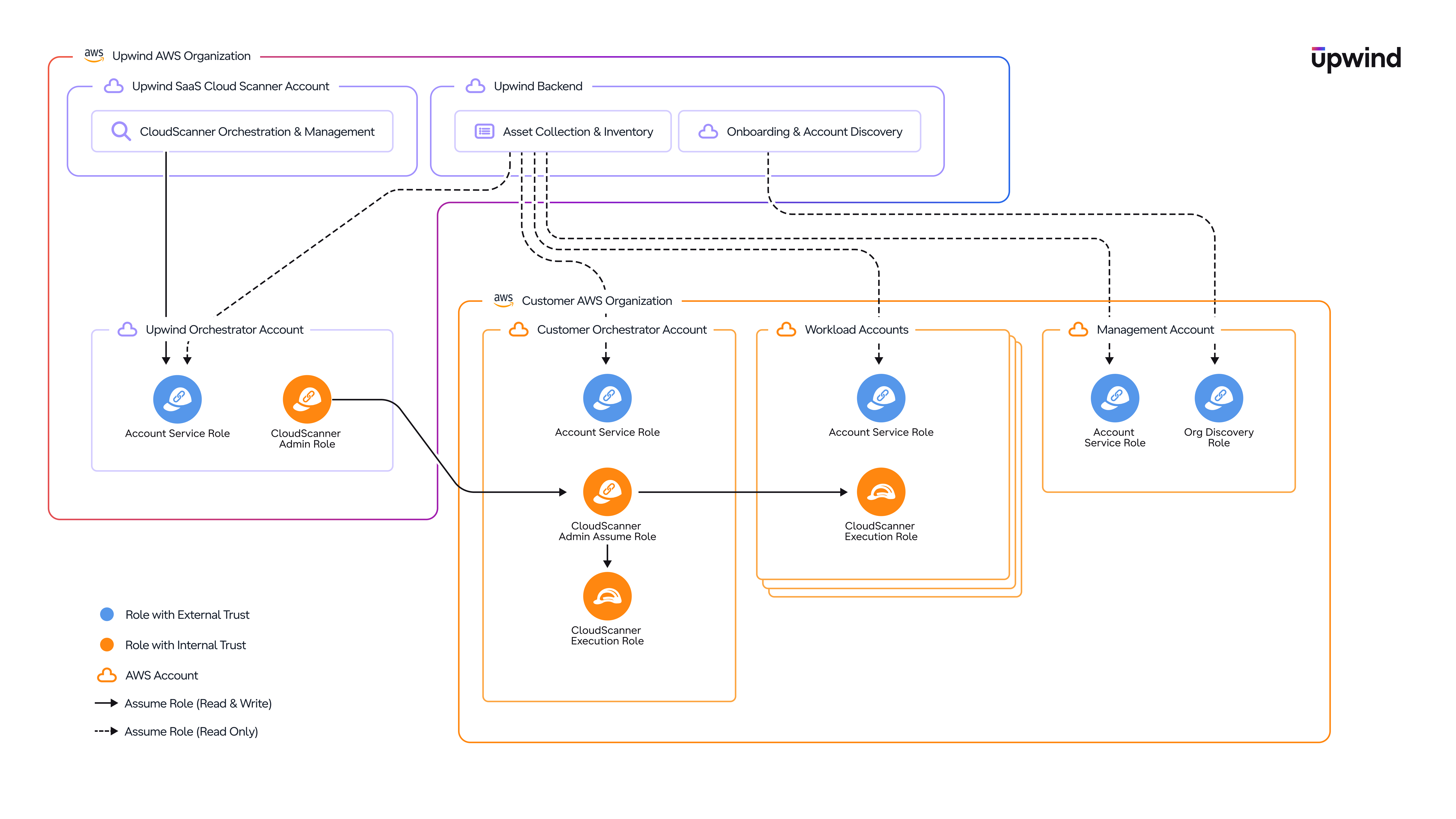
Scan Flow
The SaaS scan flow moves through four stages: onboarding and discovery, cross-account access, scanning, and reporting.
Onboarding and discovery
- Connect - The customer connects their AWS Organization to Upwind during onboarding.
- Discover accounts - Upwind uses the Org Discovery Role in the management account to discover the accounts in the organization.
- Fetch resources - Upwind uses the Account Service Role across the customer accounts to fetch account and resource information through AWS Cloud API calls.
- Identify eligible resources - Upwind identifies eligible resources across the customer's AWS Organization.
- Designate orchestrator - The customer has designated a Customer Orchestrator Account during onboarding.
Cross-account access
- Enter the customer environment - Upwind assumes from the Upwind SaaS Trust Account into the CloudScanner Customer Assume Role in the Customer Orchestrator Account.
- Reach member accounts - From the Customer Orchestrator Account, the scan flow assumes the CloudScanner Execution Role in the relevant member accounts.
Scanning
- Scan - Eligible resources are scanned in each account and region.
- Snapshot - For snapshot-based scans, snapshots are created inside the customer account.
- Share - The snapshots are shared with the customer's isolated Upwind CloudScanner SaaS Account.
- Process - CloudScanner workers running in the Upwind CloudScanner SaaS Account perform the scan.
Reporting and cleanup
- Report - Results are reported back to the Upwind platform.
- Clean up - Cleanup actions are performed as part of the scan workflow.
IAM Roles
The architecture relies on a small set of IAM roles. Each role is defined once below, with the accounts where it is deployed. The Accounts section then describes which roles each account holds.
Org Discovery Role
Deployed in the customer's AWS management account.
This role allows Upwind to discover the accounts that belong to the customer's AWS Organization. It is used during onboarding and account discovery so Upwind can understand which accounts exist under the connected organization.
Account Service Role
Deployed across all customer accounts, including the management account.
This role is responsible for fetching account and resource information through AWS Cloud API calls. It allows Upwind to discover the resources that exist across the customer's AWS Organization, supports the resource fetching and inventory process, and identifies which resources are eligible for scanning.
CloudScanner Customer Assume Role
Deployed in the Customer Orchestrator Account.
This is the role assumed by the Upwind SaaS Trust Account. It allows Upwind to enter the customer-side CloudScanner execution flow through a single controlled access point. After Upwind assumes this role, the Customer Orchestrator Account can assume the CloudScanner Execution Role in the relevant member accounts.
CloudScanner Execution Role
Deployed in the Customer Orchestrator Account and in each workload/member account. It can also be deployed in the management account (optional - see below).
This role is responsible for CloudScanner scan execution. It performs the actions required for scanning, including accessing eligible resources, creating snapshots, sharing snapshots with the Upwind CloudScanner SaaS Account, and performing cleanup actions after the scan workflow is completed.
In member accounts, this role is assumed by the Customer Orchestrator Account. Deploying it in the orchestrator account also allows the orchestrator account itself to be scanned, if it contains eligible resources.
The CloudScanner Execution Role can also be deployed in the management account if the customer chooses to scan resources that exist inside the AWS management account. This is optional: if the customer does not want the management account to be scanned, the role does not need to be used there. When enabled, the management account is scanned using the same CloudScanner execution mechanism used for the other accounts in the organization.
CloudScanner Admin Role
Deployed in the Upwind SaaS Trust Account.
This role is used by Upwind to assume the CloudScanner Customer Assume Role in the Customer Orchestrator Account. It is part of the controlled access chain that allows CloudScanner operations to reach the customer environment through the approved trust path.
Accounts
1. Customer AWS Organization
During onboarding, the customer connects their AWS Organization to Upwind. As part of this process, the customer provides the AWS management account and defines a Customer Orchestrator Account.
The customer-side deployment includes IAM roles that allow Upwind to discover the organization, access accounts, fetch resource information, identify eligible resources, and execute CloudScanner scans.
The main customer-side account types are the management account, the Customer Orchestrator Account, and the workload / member accounts.
Management Account
The AWS management account is used for organization-level discovery.
Roles deployed here:
- Org Discovery Role
- Account Service Role
- CloudScanner Execution Role - optional, only if the customer chooses to scan resources in the management account
Customer Orchestrator Account
The customer selects one account inside their AWS Organization to act as the Customer Orchestrator Account. It acts as the customer-side entry point for CloudScanner scan execution.
Instead of Upwind assuming directly into every account in the customer's AWS Organization, Upwind assumes into the Customer Orchestrator Account. From there, the orchestrator account assumes into the relevant member accounts using the CloudScanner Execution Role.
This approach reduces the number of direct external trust relationships required across the customer environment. It provides a more controlled and scalable access model, where Upwind has a single customer-side entry point, and the customer organization controls how scan execution is delegated internally across member accounts.
Roles deployed here:
- Account Service Role
- CloudScanner Customer Assume Role
- CloudScanner Execution Role - also allows the orchestrator account itself to be scanned if it contains eligible resources
Workload / Member Accounts
Workload accounts, also referred to as member accounts, are the accounts where the customer's eligible resources are located.
Roles deployed here:
- Account Service Role
- CloudScanner Execution Role - assumed by the Customer Orchestrator Account to scan the account's eligible resources
2. Upwind SaaS Trust Account
The Upwind SaaS Trust Account is the Upwind-managed AWS account used to assume into the Customer Orchestrator Account. It acts as the stable Upwind-side trust entry point into the customer environment.
This model allows Upwind to manage the customer's CloudScanner infrastructure dynamically on the SaaS side, while keeping the customer-side trust relationship stable and controlled. It enables Upwind to scale, move, or optimize CloudScanner resources behind the scenes for performance and operational efficiency, without requiring the customer to update the trusted Upwind entity in their AWS environment.
Role deployed here:
3. Upwind CloudScanner SaaS Account
The Upwind CloudScanner SaaS Account is the Upwind-managed account where the customer's CloudScanner infrastructure is deployed.
Each customer is assigned isolated CloudScanner resources within Upwind's SaaS environment. This separation ensures that scanning operations are isolated per customer.
CloudScanners are deployed in the relevant AWS regions based on where the customer has eligible resources.
A CloudScanner deployed in a specific region scans eligible customer resources in that same region. For example, resources in us-east-1 are scanned by a CloudScanner running in us-east-1, and resources in eu-west-1 are scanned by a CloudScanner running in eu-west-1.
This keeps the scanning process regionally aligned while still allowing Upwind to manage the scanner compute from the SaaS environment.
Trust and Access Model
The architecture uses a chained assume-role model. There are two main access patterns.
| Access pattern | Used for | Example actions | Diagram line |
|---|---|---|---|
| Read-only assume role | Discovery, inventory, and account/resource visibility | Discovering AWS accounts in the organization; fetching account and resource metadata through AWS Cloud API calls; identifying eligible resources; reading resource configuration required for scanner orchestration | Dashed line |
| Read-and-write assume role | Actions required to execute the scan workflow | Accessing eligible resources for scanning; creating snapshots; sharing snapshots with the Upwind CloudScanner SaaS Account; performing cleanup actions after the scan | Dotted line |
Role Trust Types
The diagram includes two types of IAM role trust relationships.
| Trust type | What it allows | Examples | Diagram color |
|---|---|---|---|
| External trust | An Upwind-managed AWS account to assume a role in the customer AWS environment, used when access crosses the boundary between Upwind and the customer organization | The CloudScanner Customer Assume Role in the Customer Orchestrator Account, which trusts the Upwind SaaS Trust Account; customer-side roles that allow Upwind to perform onboarding, discovery, or scanning actions where external trust is required | Light yellow |
| Internal trust | Use inside the customer AWS Organization or inside the Upwind-managed environment; these roles do not directly trust an external customer or third-party account, and are used as part of the internal chained access model | The CloudScanner Execution Role in member accounts, which is assumed by the Customer Orchestrator Account; the CloudScanner Admin Role used within the Upwind-side CloudScanner flow | Light orange |
Reference
Customer-Side Roles Summary
| Role | Location | Purpose |
|---|---|---|
| Org Discovery Role | Customer management account | Discovers accounts in the customer AWS Organization |
| Account Service Role | All customer accounts, including the management account | Fetches account and resource information through AWS Cloud API calls, supports discovery and inventory, and identifies eligible resources |
| CloudScanner Customer Assume Role | Customer Orchestrator Account | Role assumed by the Upwind SaaS Trust Account to enter the customer-side CloudScanner execution flow |
| CloudScanner Execution Role | Customer Orchestrator Account and workload/member accounts | Executes CloudScanner scanning actions, including access to eligible resources, snapshot creation, snapshot sharing, and cleanup |
| CloudScanner Execution Role - optional | Customer management account | Allows the management account to be scanned if the customer chooses to include management account resources in scope |
Upwind-Side Accounts Summary
| Account | Purpose |
|---|---|
| Upwind SaaS Trust Account | Stable Upwind-side trust entry point used to assume into the Customer Orchestrator Account |
| Upwind CloudScanner SaaS Account | Isolated Upwind-managed account where the customer's CloudScanner infrastructure is deployed |
Key Architectural Principles
- Scanner compute does not run inside the customer AWS environment.
- The customer deploys IAM roles that allow secure cross-account access.
- The Account Service Role is responsible for resource discovery and inventory through AWS Cloud API calls.
- The CloudScanner Execution Role is responsible for CloudScanner scan execution.
- The Customer Orchestrator Account acts as the customer-side proxy for scanning the rest of the AWS Organization.
- Upwind uses a stable SaaS Trust Account to assume into the Customer Orchestrator Account.
- CloudScanner infrastructure runs in an isolated Upwind CloudScanner SaaS Account.
- CloudScanners are deployed per relevant region and scan eligible resources in the same region.
- Snapshots are created in the customer account and shared with the Upwind CloudScanner SaaS Account.
- Scan results are reported back to the Upwind platform.
- Cleanup is handled as part of the scan workflow.
- The scan output is equivalent to the self-hosted / Outpost CloudScanner deployment model.
Security Considerations
Ephemeral snapshots do leave your AWS environment and are processed inside the Upwind-managed AWS account. Snapshots are deleted immediately after scanning completes.
All cross-account access uses AWS IAM assume-role with a scoped trust policy. The IAM role in your orchestrator account is restricted to the permissions required for snapshotting and sharing - no broader account access is granted.
For volumes protected by AWS-managed KMS keys, Upwind uses a reencryption step before the snapshot is shared. A Customer Managed Key (CMK) created in your orchestrator account during onboarding enables this. The CMK's key policy is scoped to your AWS org and the Upwind org only.